




Earn Money With Pinterest
Discover how you can turn your passion
for pinning into a profitable income stream
Earn Money With Pinterest
Discover how you can turn
your passion for pinning into
a profitable income stream
Are You Curious About Making Money on Pinterest?
Pinterest is more than just a place to discover new ideas—it's a visual search engine that offers real opportunities to earn money. Exciting, right? This could be the perfect side hustle for you!
In this post, I'll guide you through two effective methods to make money on Pinterest. First, I'll explain how to monetise Pinterest with a blog. Then, I'll provide detailed steps on how to earn money on Pinterest without a blog, so you can start right away!
Is It Possible To Make Money On Pinterest?
Pinterest is a legitimate platform for earning an income. Many online shops use it to promote their products, bloggers drive traffic to their sites, and affiliate marketers direct customers to their affiliate products.
Making money on Pinterest is not only possible, but also accessible to anyone willing to learn how to do it!
Ways To Earn Money On Pinterest
Affiliate marketing is one of the easiest ways to monetise Pinterest. It involves promoting products from other businesses using your affiliate link. When someone clicks on your link and makes a purchase, you earn a commission.
There are Two Ways to Earn Money on Pinterest through Affiliate Marketing:
You create pins that link directly to a website selling an affiliate product.
You create pins that direct traffic to your blog, where you recommend affiliate products.
Both methods utilise affiliate marketing to generate income. While Pinterest itself doesn't pay you, the affiliate programs do.
The first method is straightforward: your pin links directly to an affiliate product. This approach is quicker and easier to implement.
The second method involves sending users to your blog first, where you recommend the affiliate product. Although this requires more effort, it has the potential to earn more money because:
Few people purchase an affiliate product without a recommendation from a trusted source. A blog provides you with a platform to establish a relationship with your audience. When readers trust your opinion, they are more likely to purchase the affiliate products you recommend.
When you have a blog you can also make money by adding other income streams, like writing sponsored posts, displaying ads, offering services, or selling digital products like ebooks, printables, courses etc.
Earning Money On Pinterest Without A Blog
If starting a blog isn't your interest, you can still generate affiliate sales directly on Pinterest.
Here are the steps to make money on Pinterest without a blog:
Choose an affiliate product you want to promote.
Join an affiliate program that offers this product.
Create a Pinterest business account.
Establish Pinterest boards that align with your affiliate product.
Populate these boards with relevant pins showcasing similar products.
Design a compelling pin image for your affiliate product.
Publish your pin on Pinterest.
Embed your affiliate link into the pin.
Craft a title and description for your pin rich in keywords.
Incorporate relevant hashtags, including #affiliate.
Pin your content to a suitable Pinterest board alongside similar pins.
Develop multiple pins for each affiliate product.
Maintain a consistent pinning schedule of 15-20 pins daily.
Utilise a scheduler such as Tailwind to optimise pinning times.
Let's delve deeper into these steps
1. Choose an affiliate product that you want to promote
To succeed without a blog, select products that can effectively sell themselves with just a single photo or video pin.
Here are some products that could work well:
Pet accessories
Camping equipment
Jewellery/accessories
Home interiors
Clothing
There are certainly many other categories that could also be effective. When we scroll through Pinterest we are often compelled to buy something just from seeing a photo.
Grab my free guide below on how to set up a Pinterest Business account.

I might make a small commission from affiliate links in this post, but it won't cost you anything extra. Please read my disclaimer for more details.
2. Join an affiliate program that offers this product
Once you've chosen a product, the next step is to locate an affiliate program that features this product.
Here are two methods to accomplish this:
You can search for your chosen product on Google and check the websites that appear. Navigate to a website and scroll down to the bottom of the page. Many websites with affiliate programs often include a link in the footer similar to this:
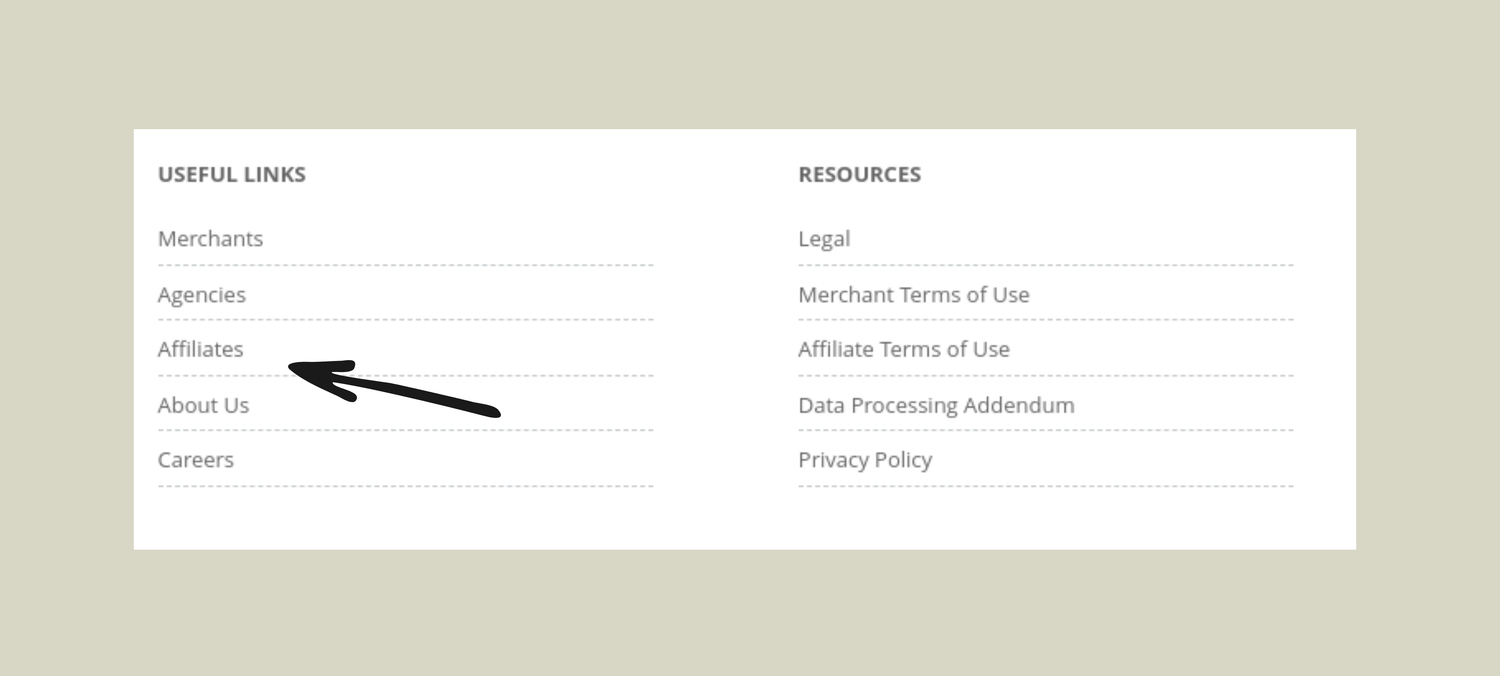
Click on the link and register for the program. (Note: Some affiliate programs may require you to have a website and may not approve your application without one. Explore different programs to find one that doesn't have this requirement.)
You enrol in an affiliate network, which acts as an intermediary between companies (merchants) selling affiliate products and publishers/affiliate marketers (like you). Affiliate networks are advantageous because you only need to register once to gain access to multiple merchants.
Here are some affiliate networks:
CJ Affiliates
Shareasale
Clickbank
Awin
3. Create a Pinterest business account.
To sell on Pinterest, you must establish a business account.
A business account offers several benefits:
Product Pins
Rich Pins
Promoted Pins
Account Bio with Keywords
Pinterest analytics
If you're looking for assistance in setting up your Pinterest business account properly, download my free guide: "Setting Up Pinterest Like A Pro" This comprehensive resource will not only guide you through the setup process but also teach you how to effectively implement SEO and optimal pinning strategies.
Get My Free Pinterest Guide Here.
Below is my Pinterest business account, showcasing the use of keywords in the account name and description.

Click HERE to go to Pinterest and open a business account
4. Set Up Pinterest Boards Related to Your Affiliate Product
Aim to create at least 15 Pinterest boards that align with the products you intend to sell.
Name your boards with relevant titles and descriptions.
Using keywords is crucial because Pinterest functions as a search engine, and keywords will enhance the visibility of your pins.
To discover popular keywords on Pinterest, use the Pinterest search bar.
Enter your product or category, and Pinterest will autocomplete your query with commonly searched terms, like this:
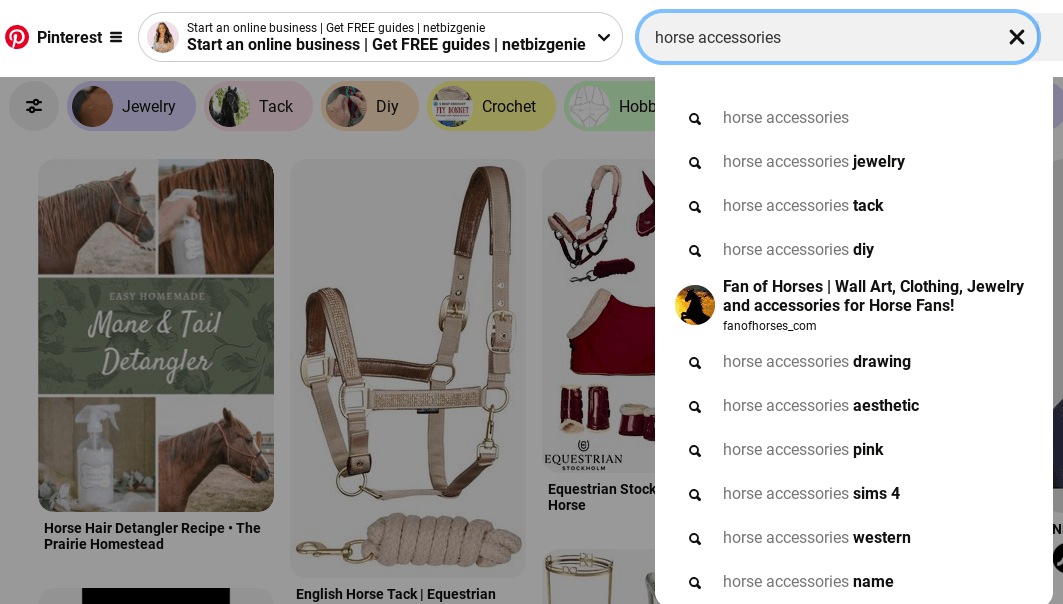
You can use the suggestions in the search box as titles for Pinterest boards. Remember to keep within a particular niche, and don't deviate from it.
5. Populate Your Pinterest Boards with Relevant Pins
Use the Pinterest search bar to discover relevant pins to add to your boards. Avoid pinning too much at once to prevent being flagged as spam. Pin a few times a day, gradually increasing until you reach 15 to 25 pins daily.
6. Design a Pin Image
To attract clicks, create eye-catching pin graphics that showcase your product. Ensure your pin image is vertical, ideally 600 x 900 pixels or slightly taller. Use tools like Canva to add text and enhance your pins.
7. Post Your Pin on Pinterest
To upload your pin, navigate to the top right corner of your Pinterest account and click on the red plus icon. Then, select "Create Pin."

A box will open like this:
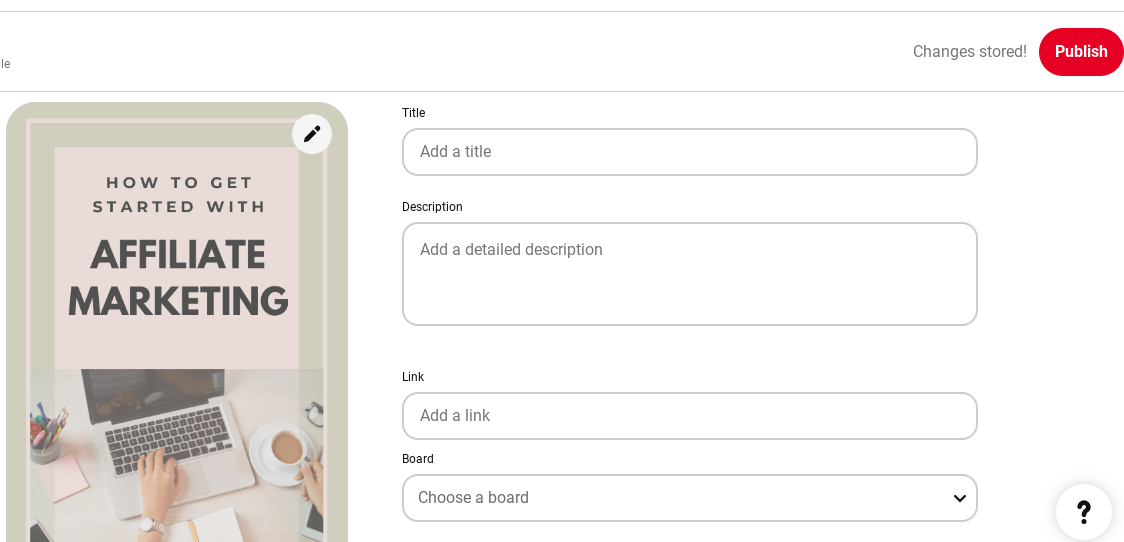
Upload an image and then complete all the boxes. You can then publish it by clicking the red button in the top right hand corner.
8. Craft a Keyword-Rich Title and Description for Your Pin
Enter your title in the designated field and ensure it includes your primary keywords. Then, in the description, provide additional details about your product in a compelling way, incorporating keywords naturally. Use this space to encourage users to click through to the website.
9. Include Relevant Hashtags and #affiliate in Your Pin
Add a few hashtags to the end of your description after researching suitable keywords (as explained in step 4). Also include #affiliate to comply with disclosure requirements for affiliate links.
10. Insert Your Affiliate Link into Your Pin
Access your affiliate dashboard to locate the specific affiliate link for the product featured in your pin. Copy the link and paste it into the "Add a destination link" section.
11. Share Your Pin on a Relevant Pinterest Board with Similar Content
Click "Select" at the top right to choose a board from the dropdown menu. Be sure to pin it to the most appropriate board that shares similar keywords. This helps Pinterest understand the context of your pin.
For efficiently pinning your content to multiple relevant boards, I highly recommend using Tailwind. Tailwindis an approved Pinterest scheduler that allows you to distribute your pin across up to 10 boards simultaneously. The tool ensures your pins are spaced out to avoid overwhelming your followers and selects optimal posting times when your audience is most active. This approach maximizes your pin's reach, leading to more repins, clicks, and sales.
12. Create Multiple Pins for Each Affiliate Product
Pinterest values fresh content, so it's beneficial to craft multiple variations of pins for each affiliate product and aim to upload at least one new pin daily.
Learn How to Generate Numerous Pinterest Pins Quickly
13. Maintain a Consistent Pinning Schedule
Attempt to pin 10-20 Pins Daily, consistency is key on Pinterest. Pinterest recommends pinning between 15 and 25 pins daily, including pins from other users.
Initially, you'll pin more from other accounts, but as you accumulate your own content, you'll increase the proportion of your own pins. Pinterest tends to prioritise original pins, so generating a variety of new pins enhances your visibility. Personally, I pin approximately 90% of my own content and 10% from others.
Avoid pinning all your content simultaneously; instead, use Tailwind to schedule pins evenly throughout the day.
Ready to turn Pinterest into a money-making machine? Click here to take my Pinterest Basics course and get set up for success today!

Upload an image and then complete all the boxes. You can then publish it by clicking the red button in the top right hand corner.
8. Craft a Keyword-Rich Title and Description for Your Pin
Enter your title in the designated field and ensure it includes your primary keywords. Then, in the description, provide additional details about your product in a compelling way, incorporating keywords naturally. Use this space to encourage users to click through to the website.
9. Include Relevant Hashtags and #affiliate in Your Pin
Add a few hashtags to the end of your description after researching suitable keywords (as explained in step 4). Also include #affiliate to comply with disclosure requirements for affiliate links.
10. Insert Your Affiliate Link into Your Pin
Access your affiliate dashboard to locate the specific affiliate link for the product featured in your pin. Copy the link and paste it into the "Add a destination link" section.
11. Share Your Pin on a Relevant Pinterest Board with Similar Content
Click "Select" at the top right to choose a board from the dropdown menu. Be sure to pin it to the most appropriate board that shares similar keywords. This helps Pinterest understand the context of your pin.
For efficiently pinning your content to multiple relevant boards, I highly recommend using Tailwind. Tailwindis an approved Pinterest scheduler that allows you to distribute your pin across up to 10 boards simultaneously. The tool ensures your pins are spaced out to avoid overwhelming your followers and selects optimal posting times when your audience is most active. This approach maximizes your pin's reach, leading to more repins, clicks, and sales.
12. Create Multiple Pins for Each Affiliate Product
Pinterest values fresh content, so it's beneficial to craft multiple variations of pins for each affiliate product and aim to upload at least one new pin daily.
Learn How to Generate Numerous Pinterest Pins Quickly
13. Maintain a Consistent Pinning Schedule
Attempt to pin 10-20 Pins Daily, consistency is key on Pinterest. Pinterest recommends pinning between 15 and 25 pins daily, including pins from other users.
Initially, you'll pin more from other accounts, but as you accumulate your own content, you'll increase the proportion of your own pins. Pinterest tends to prioritise original pins, so generating a variety of new pins enhances your visibility. Personally, I pin approximately 90% of my own content and 10% from others.
Avoid pinning all your content simultaneously; instead, use Tailwind to schedule pins evenly throughout the day.

HEY I'M EMMA
I help hardworking,
passionate women like you
start and grow your online
business step by step.



Are You Curious About Making Money on Pinterest?
Pinterest is more than just a place to discover new ideas—it's a visual search engine that offers real opportunities to earn money. Exciting, right? This could be the perfect side hustle for you!
In this post, I'll guide you through two effective methods to make money on Pinterest. First, I'll explain how to monetise Pinterest with a blog. Then, I'll provide detailed steps on how to earn money on Pinterest without a blog, so you can start right away!
Is It Possible To Make Money On Pinterest?
Pinterest is a legitimate platform for earning an income. Many online shops use it to promote their products, bloggers drive traffic to their sites, and affiliate marketers direct customers to their affiliate products.
Making money on Pinterest is not only possible, but also accessible to anyone willing to learn how to do it!
Ways To Earn Money On Pinterest
Affiliate marketing is one of the easiest ways to monetise Pinterest. It involves promoting products from other businesses using your affiliate link. When someone clicks on your link and makes a purchase, you earn a commission.
There are Two Ways to Earn Money on Pinterest through Affiliate Marketing:
You create pins that link directly to a website selling an affiliate product.
You create pins that direct traffic to your blog, where you recommend affiliate products.
Both methods utilise affiliate marketing to generate income. While Pinterest itself doesn't pay you, the affiliate programs do.
The first method is straightforward: your pin links directly to an affiliate product. This approach is quicker and easier to implement.
The second method involves sending users to your blog first, where you recommend the affiliate product. Although this requires more effort, it has the potential to earn more money because:
Few people purchase an affiliate product without a recommendation from a trusted source. A blog provides you with a platform to establish a relationship with your audience. When readers trust your opinion, they are more likely to purchase the affiliate products you recommend.
When you have a blog you can also make money by adding other income streams, like writing sponsored posts, displaying ads, offering services, or selling digital products like ebooks, printables, courses etc.
Earning Money On Pinterest Without A Blog
If starting a blog isn't your interest, you can still generate affiliate sales directly on Pinterest.
Here are the steps to make money on Pinterest without a blog:
Choose an affiliate product you want to promote.
Join an affiliate program that offers this product.
Create a Pinterest business account.
Establish Pinterest boards that align with your affiliate product.
Populate these boards with relevant pins showcasing similar products.
Design a compelling pin image for your affiliate product.
Publish your pin on Pinterest.
Embed your affiliate link into the pin.
Craft a title and description for your pin rich in keywords.
Incorporate relevant hashtags, including #affiliate.
Pin your content to a suitable Pinterest board alongside similar pins.
Develop multiple pins for each affiliate product.
Maintain a consistent pinning schedule of 15-20 pins daily.
Utilise a scheduler such as Tailwind to optimise pinning times.
Let's delve deeper into these steps
1. Choose an affiliate product that you want to promote
To succeed without a blog, select products that can effectively sell themselves with just a single photo or video pin.
Here are some products that could work well:
Pet accessories
Camping equipment
Jewellery/accessories
Home interiors
Clothing
There are certainly many other categories that could also be effective. When we scroll through Pinterest we are often compelled to buy something just from seeing a photo.
Grab my free guide below on how to set up a Pinterest Business account.
I might make a small commission from affiliate links in this post, but it won't cost you anything extra. Please read my disclaimer for more details.
2. Join an affiliate program that offers this product
Once you've chosen a product, the next step is to locate an affiliate program that features this product.
Here are two methods to accomplish this:
You can search for your chosen product on Google and check the websites that appear. Navigate to a website and scroll down to the bottom of the page. Many websites with affiliate programs often include a link in the footer similar to this:
Click on the link and register for the program. (Note: Some affiliate programs may require you to have a website and may not approve your application without one. Explore different programs to find one that doesn't have this requirement.)
You enrol in an affiliate network, which acts as an intermediary between companies (merchants) selling affiliate products and publishers/affiliate marketers (like you). Affiliate networks are advantageous because you only need to register once to gain access to multiple merchants.
Here are some affiliate networks:
CJ Affiliates
Shareasale
Clickbank
Awin
3. Create a Pinterest business account.
To sell on Pinterest, you must establish a business account.
A business account offers several benefits:
Product Pins
Rich Pins
Promoted Pins
Account Bio with Keywords
Pinterest analytics
If you're looking for assistance in setting up your Pinterest business account properly, download my free guide: "Setting Up Pinterest Like A Pro" This comprehensive resource will not only guide you through the setup process but also teach you how to effectively implement SEO and optimal pinning strategies.
Get My Free Pinterest Guide Here.
Below is my Pinterest business account, showcasing the use of keywords in the account name and description.
Click HERE to go to Pinterest and open a business account
4. Set Up Pinterest Boards Related to Your Affiliate Product
Aim to create at least 15 Pinterest boards that align with the products you intend to sell.
Name your boards with relevant titles and descriptions.
Using keywords is crucial because Pinterest functions as a search engine, and keywords will enhance the visibility of your pins.
To discover popular keywords on Pinterest, use the Pinterest search bar.
Enter your product or category, and Pinterest will autocomplete your query with commonly searched terms, like this:
You can use the suggestions in the search box as titles for Pinterest boards. Remember to keep within a particular niche, and don't deviate from it.
5. Populate Your Pinterest Boards with Relevant Pins
Use the Pinterest search bar to discover relevant pins to add to your boards. Avoid pinning too much at once to prevent being flagged as spam. Pin a few times a day, gradually increasing until you reach 15 to 25 pins daily.
6. Design a Pin Image
To attract clicks, create eye-catching pin graphics that showcase your product. Ensure your pin image is vertical, ideally 600 x 900 pixels or slightly taller. Use tools like Canva to add text and enhance your pins.
7. Post Your Pin on Pinterest
To upload your pin, navigate to the top right corner of your Pinterest account and click on the red plus icon. Then, select "Create Pin."
A box will open like this:
Upload an image and then complete all the boxes. You can then publish it by clicking the red button in the top right hand corner.
8. Craft a Keyword-Rich Title and Description for Your Pin
Enter your title in the designated field and ensure it includes your primary keywords. Then, in the description, provide additional details about your product in a compelling way, incorporating keywords naturally. Use this space to encourage users to click through to the website.
9. Include Relevant Hashtags and #affiliate in Your Pin
Add a few hashtags to the end of your description after researching suitable keywords (as explained in step 4). Also include #affiliate to comply with disclosure requirements for affiliate links.
10. Insert Your Affiliate Link into Your Pin
Access your affiliate dashboard to locate the specific affiliate link for the product featured in your pin. Copy the link and paste it into the "Add a destination link" section.
11. Share Your Pin on a Relevant Pinterest Board with Similar Content
Click "Select" at the top right to choose a board from the dropdown menu. Be sure to pin it to the most appropriate board that shares similar keywords. This helps Pinterest understand the context of your pin.
For efficiently pinning your content to multiple relevant boards, I highly recommend using Tailwind. Tailwindis an approved Pinterest scheduler that allows you to distribute your pin across up to 10 boards simultaneously. The tool ensures your pins are spaced out to avoid overwhelming your followers and selects optimal posting times when your audience is most active. This approach maximizes your pin's reach, leading to more repins, clicks, and sales.
12. Create Multiple Pins for Each Affiliate Product
Pinterest values fresh content, so it's beneficial to craft multiple variations of pins for each affiliate product and aim to upload at least one new pin daily.
Learn How to Generate Numerous Pinterest Pins Quickly
13. Maintain a Consistent Pinning Schedule
Attempt to pin 10-20 Pins Daily, consistency is key on Pinterest. Pinterest recommends pinning between 15 and 25 pins daily, including pins from other users.
Initially, you'll pin more from other accounts, but as you accumulate your own content, you'll increase the proportion of your own pins. Pinterest tends to prioritise original pins, so generating a variety of new pins enhances your visibility. Personally, I pin approximately 90% of my own content and 10% from others.
Avoid pinning all your content simultaneously; instead, use Tailwind to schedule pins evenly throughout the day.
HEY I'M EMMA
I help hardworking,
passionate women like you
start and grow your online
business step by step.


Follow us on